
Introduction
The Small Problem You Don’t Think About
Working from a coffee shop sounds great.
Until it isn’t.
You open your laptop. Slack, emails, browser tabs. Everything you need to get things done. It feels normal, productive, efficient.
Then someone walks behind you.
Nothing dramatic.
Nothing critically sensitive.
But still… not ideal.
This is the kind of situation often described as shoulder surfing. Not a security breach, not an emergency, but just enough to make you uncomfortable.
And once you notice it, you start noticing it all the time.
The Usual “Solutions” Don’t Really Work
There are ways to deal with it.
You can minimize everything.
You can lock your screen.
You can try to angle your laptop or move seats.
Technically, all of these work.
But they come with trade-offs.
Minimizing everything breaks your workflow.
Locking your screen is too aggressive for a small situation.
Physically adjusting your position is temporary and unreliable.
What you really want is something that lets you hide your screen instantly without interrupting what you’re doing.
Something lightweight.
Something fast.
Something that doesn’t force a full context switch.
The Moment That Keeps Repeating
It wasn’t one big event that made me think about this.
It was repetition.
That small hesitation every time someone walks behind you.
That split-second decision: do I hide my screen or not?
It slows you down just enough to notice it.
And when you work in public regularly, that friction adds up.
What I Was Looking For
I wasn’t looking for security software.
I wasn’t trying to encrypt anything or lock down my machine.
I just wanted a simple way to protect my screen in public.
Press one shortcut.
Make everything look normal again.
Keep working.
That’s it.
Building a Simple Solution
I couldn’t find anything that felt right.
So I built something for myself and turned it into a small desktop app.
The idea is straightforward.
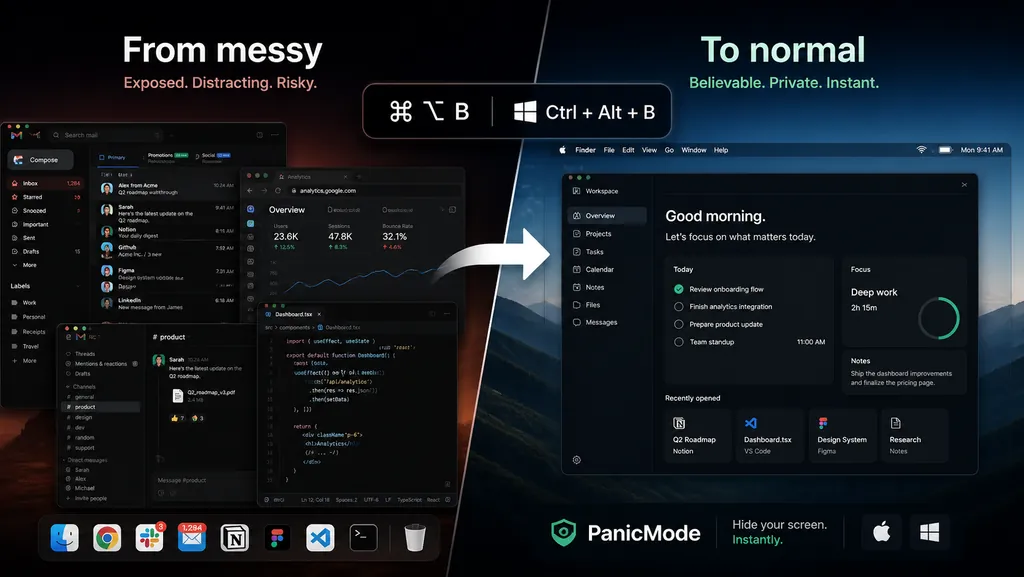
You press a shortcut, and your messy screen instantly turns into a clean, normal-looking workspace.
Instead of minimizing everything or locking your computer, it replaces your current view with something that looks like a real environment.
Here’s what it looks like in practice:
Why This Approach Works Better
The key difference is not just hiding things.
It’s how they are hidden.
Minimizing windows leaves an empty desktop.
Locking your screen makes it obvious you stopped working.
Both draw attention.
Instead, the goal here is to blend in naturally.
The screen still looks active.
It still looks like a real workspace.
It doesn’t raise questions.
That’s a subtle but important difference.
Not Just a Static Screen
One thing I didn’t want was a fake overlay.
The workspace needed to feel real.
So the app is fully interactive and customizable.
You can adjust the environment to match your setup, whether that’s macOS or Windows, change the background, and choose between different presets like a neutral office setup or a developer-style workspace.
The goal is simple:
when someone looks at your screen, it should feel indistinguishable from a real working environment.
A Small Problem, Still Worth Solving
This is not a critical security issue.
It’s not something that breaks your day.
But it is one of those small, recurring annoyances that show up every time you work in public.
And those are often the best problems to solve.
Because the improvement is immediate.
No learning curve.
No setup overhead.
Just one shortcut that removes a bit of friction from your day.
If You Run Into the Same Thing
If you work from coffee shops, shared spaces, or anywhere public, you’ve probably experienced this at least once.
If you’re curious, you can try it here:
It’s still early, but already part of my daily workflow.