
Introduction
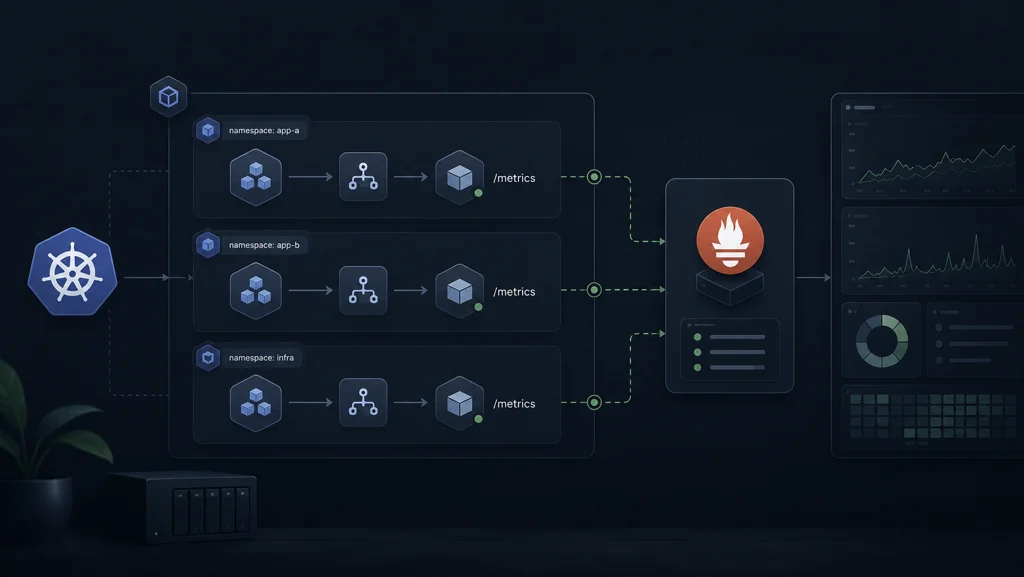
In Part 1, I focused on metric shape and semantics. In Part 2, I focused on collection reliability. This part is where those decisions get translated into Kubernetes and Prometheus wiring that can survive normal production churn.
Note: This article assumes a Kubernetes setup. If you want the homelab context behind this environment, see Running K3s at Home.
When this exporter was still local, everything looked easy. The moment it moved into the cluster, the real questions changed. The challenge was no longer "can I expose /metrics?" The challenge became "can I keep this dependable when pods restart, nodes move, configs evolve, and someone else has to operate this at 2 AM?"
The Deployment Shape I Settled On
In this case, the panicmode-site namespace is specific to my PanicMode project, so the manifests in this series reflect that naming directly.
I run the exporter as a single-replica deployment, with a dedicated service and a persistent cache volume. The container exposes port 8000 as metrics, and the probes are intentionally simple: readiness goes through /ready, while liveness checks /metrics.
That split matters. Readiness should answer "is this collector actually ready to serve trustworthy data right now?" Liveness should answer "is the process alive enough to recover if stuck?" Keeping those concerns separate reduced false restarts for me.
I also mount the cache directory at /var/lib/cloudflare-analytics-exporter so the SQLite state survives pod replacement. Without that persistence, short disruptions become data continuity problems again.
containers:
- name: exporter
ports:
- name: metrics
containerPort: 8000
readinessProbe:
httpGet:
path: /ready
port: metrics
livenessProbe:
httpGet:
path: /metrics
port: metrics
volumeMounts:
- name: cache
mountPath: /var/lib/cloudflare-analytics-exporter
volumes:
- name: cache
persistentVolumeClaim:
claimName: cloudflare-analytics-exporter-cache
Configuration Boundaries: Secret vs Runtime Tuning
I keep Cloudflare credentials in a Kubernetes secret and inject them via envFrom. Runtime behavior, on the other hand, lives in explicit environment variables in the deployment spec. This gives me a cleaner operating model: secret rotation and tuning changes are separate workflows.
The practical knobs that mattered most were collection interval, bucket width, delay offset, cache retention, and replay/backfill bounds. I treat those as operational controls, not code constants, because their best values depend on real cluster behavior and dashboard expectations.
envFrom:
- secretRef:
name: cloudflare-analytics-exporter
env:
- name: CF_COLLECTION_INTERVAL_SECONDS
value: "600"
- name: CF_BUCKET_SECONDS
value: "3600"
- name: CF_DELAY_SECONDS
value: "300"
- name: CF_CACHE_RETENTION_HOURS
value: "96"
- name: CF_BACKFILL_MAX_HOURS
value: "72"
Service Discovery: Two Paths, One Intention
I intentionally support both service annotations and ServiceMonitor style discovery.
The service includes classic Prometheus scrape annotations for environments that still rely on annotation-based discovery. At the same time, I maintain a ServiceMonitor in panicmode-site for Prometheus Operator style setups.
This dual wiring sounds redundant, but it kept migration paths smoother across clusters with different monitoring conventions. The intention is simple: make target discovery boring and predictable.
apiVersion: monitoring.coreos.com/v1
kind: ServiceMonitor
metadata:
name: cloudflare-analytics-exporter
namespace: panicmode-site
spec:
selector:
matchLabels:
app.kubernetes.io/name: cloudflare-analytics-exporter
endpoints:
- port: metrics
path: /metrics
interval: 1m
Prometheus Scrape Configuration Choices
In the Prometheus config path, I define a dedicated job for the exporter and use a one-minute scrape interval. That cadence aligns with the reliability model from Part 2 without creating unnecessary ingestion churn.
I also keep out_of_order_time_window explicitly configured because replay and controlled backfill workflows can legitimately introduce timestamp ordering edge cases. Being explicit here avoids confusion later when historical repair operations are needed.
The important lesson for me was that scrape config is not just plumbing. It is part of your data contract. If scrape timing and replay policy disagree, your dashboards will slowly drift from your intent.
storage:
tsdb:
out_of_order_time_window: 35d
scrape_configs:
- job_name: cloudflare-analytics-exporter
scrape_interval: 1m
static_configs:
- targets: ["cloudflare-analytics-exporter.panicmode-site.svc.cluster.local:8000"]
Resource Limits and Stability
I started conservative on resources and adjusted only when evidence required it. For this workload, predictable memory behavior mattered more than aggressive throughput. The exporter does lightweight polling and formatting work, so the bigger risk was not CPU saturation; it was unstable behavior from overly tight limits during I/O or bursty cluster periods.
Small, explicit limits combined with persistent cache and stable probes gave me the most predictable behavior.
Image, Pull Policy, and Rollout Reality
I use an explicit registry image and imagePullPolicy: Always in this setup because I want fast pickup of refreshed tags during iterative rollout cycles. In stricter environments, I would pin digests and use immutable promotion paths, but for this stage of iteration I prioritized release velocity with clear deployment ownership.
What mattered operationally was not philosophical purity around tags. It was making sure rollout behavior was understood by the team and visible through normal Kubernetes status checks.
The Operational Flow I Actually Use
The day-to-day flow became straightforward once the wiring stabilized. I deploy the exporter manifests, verify deployment and pod readiness, confirm service target reachability, and then validate scrape visibility in Prometheus before touching Grafana panels.
This order sounds obvious, but skipping steps is exactly how people end up debugging dashboards for issues that are really target discovery or scrape wiring problems.
My mental model is layered: collector health first, scrape health second, dashboard interpretation third.
What Broke Early and What Fixed It
Most early incidents were not Cloudflare API failures. They were configuration coordination issues. A probe path mismatch, a missing secret key, a cache path that was not truly durable, or a scrape target not aligned with actual service naming can all produce misleading symptoms.
The fixes were mostly about explicitness: explicit paths, explicit labels, explicit intervals, explicit boundaries between readiness and liveness, and explicit deployment conventions.
That is the recurring theme for this whole series so far. Reliability is rarely one clever trick. It is the accumulation of clear, boring, explicit decisions.
Next
Part 4 is where this all pays off in Grafana. I’ll show how I overlay cloudflare_zone_requests and cloudflare_zone_unique_visitors with custom metrics in one dashboard, how I read that overlap without fooling myself, and how I use it to reason about impact instead of just observing traffic.